For getting to know your audience, web analytics is a game-changer there’s no avoiding and for good reason. It also provides a glimpse of how users behave, while not being on their phones (which is great for website owners, App developers, and iPhone users) But there’s another question that comes up, the tracking of Safari users—as in, is this really necessary?
The key lies in appreciating the specific limitations and opportunities of Safari. This article will explore the most practical information about analytic implementation for Safari, such as its native limitations, best tools for the job (third-party), and a complete walkthrough on how to unlock essential Safari user data.
As you read this quick guide to analytics for Safari, you’ll not only understand how to configure analytic for Safari but how the data can be used for optimizing the user’s experience and accomplishing your business goals.
Why Safari Analytics Matters

Safari might not have the class-leading market share that Chrome holds, but it’s a heavyweight on iOS devices. Because over 54% of mobile traffic in the U.S. comes from Safari users – and you have a significant blind spot when it comes to Safari analytic.
These people are typically high-value consumers (or famous or tech-savy), especially given that Apple devices tend to be linked with wealthier, more digitally-adept users. If you are trying to fine-tune your website to attract better traffic, up your conversions or improve your marketing initiatives, excluding Safari can also mean missing one layer after another of useful insights.
Understanding Safari’s Built-In Limitations
User privacy is both what Safari does perfectly and its achilles heel when it comes to analytic. Apple updates Safari’s privacy settings regularly with features like Intelligent Tracking Prevention (ITP), which restricts how cookies can track users across sites.
Key Limitations of Safari’s Analytics
- Restricted Cookies
Safari limits third-party cookie lifetimes, with some cookies expiring in as little as 24 hours. Long-term tracking or retargeting might be hindered as a result.
- Reduced Third-Party Access
Due to stricter privacy controls, Safari limits the use of third-party scripts, making it harder for tools like Google Analytic to gather complete data.
- Gaps in Attribution Data
ITP also impacts attribution tracking, resulting in incomplete information about the user’s conversion path. If someone clicks an ad and completes a purchase later, Safari might not preserve enough data to attribute the sale to the ad.
Understanding these limitations gives you a clear picture of where native Safari analytics might fall short. Fortunately, there are ways to bridge these gaps using third-party tools.
Google Analytics and Safari-Compatible Tools
Despite Safari’s restrictions, third-party analytics tools remain your best bet for gathering meaningful insights. Google Analytics, for example, offers robust solutions designed to overcome some of Safari’s tracking obstacles.
Why Google Analytics?
Google Analytic is the industry gold standard, known for its versatility and adaptability. While Intelligent Tracking Prevention does influence its ability to collect cookies, Google’s updates have enabled developers to use first-party cookies more effectively.
Other Analytics Tools for Safari Users
- Matomo (formerly Piwik): An open-source analytic platform that offers advanced features such as heatmaps while respecting user privacy.
- Adobe Analytics: Designed for enterprise-level use, Adobe Analytic provides a wide range of metrics to track user behavior.
- Heap Analytics: A newer player, focusing on event-based analytics for tracking specific user actions.
By complementing Google Analytics with tools like Matomo or Heap, you can fill in the blanks left by Safari’s privacy-first approach.
Step-by-Step Guide to Implement Analytics in Safari
Now, it’s time to put theory into action. Follow these steps to set up effective analytic for Safari users.
Step 1. Use Google Analytics 4 (GA4)
Apple’s privacy controls make Google’s newer analytics model, GA4, a better bet than Universal Analytics. GA4 relies on first-party cookies, making it more resilient to Safari’s restrictions.
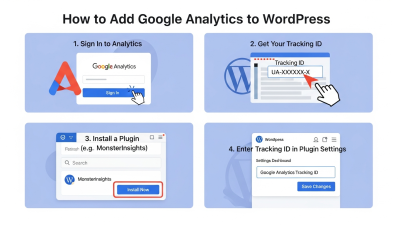
- Log into your Google Analytics account and create a new property in GA4.
- Generate the GA4 measurement ID for your website.
- Use the Global Site Tag or Google Tag Manager to implement the tracking code on your site. These are configured to leverage first-party cookies.
Step 2. Adapt with a Consent Management Platform (CMP)
Safari analytics work best when paired with user consent mechanisms. Employ a CMP (like Cookiebot) to ensure your tracking complies with privacy regulations like GDPR or Apple’s App Tracking Transparency.
- Integrate the CMP tool with your analytics platform.
- Display user-friendly consent banners to gather opt-ins.
Step 3. Configure Analytics for Server-Side Tracking
To avoid some of the pitfalls associated with client-side data collection (like ad blockers or cookie restrictions), use server-side tracking. Many platforms, including Google Analytics, support this functionality.
- Ensure your analytics tool supports server-side implementations.
- Set up a server endpoint to collect and forward user events back to your chosen platform.
Step 4. Test and Monitor Performance
Make use of tools like Google Tag Assistant or Facebook’s Pixel Helper to ensure proper implementation. Check dashboards to ensure data from Safari users is being tracked.
Best Practices for Analyzing Safari Traffic
Collecting data is only half the story. The real value lies in interpreting and acting on it. Here are some best practices to help you analyze Safari user data effectively.
1. Prioritize Mac and iOS Segments
Segment users based on their operating systems. Use Google Analytics to create custom segments for Safari traffic and compare their behavior to users of other browsers like Chrome or Edge.
2. Monitor Short-Term Behavioral Trends
Since Safari restricts long-term cookie tracking, adopt a short-term approach. Frequent reporting will help you map trends before cookies expire.
3. Focus on Conversion Funnels
Use your data to closely analyze how Safari users move through your website’s conversion funnels. Identify any blockers and optimize accordingly.
4. Respect User Privacy
Lastly, ensure transparency in data collection by staying compliant with privacy laws like GDPR or California’s Consumer Privacy Act (CCPA). Explain what data you collect and why; earning user trust will pay dividends over time.
Understanding User Engagement Patterns

Analyzing user behavior on Safari goes beyond basic metrics like page views. By closely observing how users interact with navigation menus, buttons, or forms, you can uncover meaningful patterns that indicate engagement levels. Incorporating qualitative data analysis allows you to interpret these behaviors, identifying pain points or friction in the user journey. Heatmaps, session recordings, and surveys complement traditional analytics, helping to understand motivations behind actions. By combining these insights with first-party data collected from Google Analytics 4 or server-side tracking, businesses can create more personalized experiences. Tracking trends over time, even in short cookie windows, ensures that optimizations are informed and precise, ultimately improving conversions and user satisfaction.
Centralizing Data for Better Insights
When managing multiple sources of analytics, centralization becomes crucial. Customer data platforms enable businesses to integrate data from Safari, Chrome, and other traffic sources into a unified system. This allows for a holistic view of user behavior, combining event tracking, purchase history, and demographic information. By consolidating data, marketers can avoid fragmented reports and make decisions based on comprehensive insights. Integrating consent management ensures compliance with privacy regulations while maximizing data reliability. Using a single platform for analysis also facilitates segmentation, trend identification, and predictive modeling, ensuring that high-value Safari users are properly understood and effectively targeted in marketing campaigns.
Improving Conversion Funnel Analysis
Analyzing the conversion funnel for Safari users requires attention to short-term tracking windows and restricted cookies. Server-side tracking can capture more reliable data on user progression from landing pages to checkout, while event-based analytics highlights where drop-offs occur. Using insights from qualitative data analysis, businesses can identify barriers to completion and test alternative flows. Combining this with data from first-party cookies ensures attribution accuracy for conversions. Visualizing these trends regularly allows for timely optimizations, enhancing overall site performance. By understanding behavior at each step of the funnel, website owners can implement targeted interventions that improve engagement, reduce bounce rates, and maximize conversion rates across Safari traffic.
Optimizing Campaign Performance
Safari’s privacy restrictions can make it harder to evaluate marketing campaigns using traditional methods. Customer data platforms help track user interactions across channels, even when some data is limited by Intelligent Tracking Prevention. Combining first-party analytics, server-side tracking, and consent management ensures that campaign performance metrics are as accurate as possible. By segmenting Safari users separately, marketers can evaluate engagement, click-through rates, and conversion outcomes with precision. Insights gained from data analysis bootcamp-style approaches—focusing on patterns and actionable trends—help optimize messaging, creative, and placement strategies. Ultimately, this allows campaigns to be adjusted in near real-time, maximizing ROI while respecting user privacy preferences.
Predicting User Behavior
Predictive insights are invaluable when working with limited cookie data. By analyzing historical Safari user behavior alongside event-based metrics, businesses can forecast trends in engagement, churn, or conversion likelihood. Applying statistical models and patterns derived from qualitative data analysis improves the accuracy of these predictions. Integrating customer data platforms ensures that predictions consider multiple touchpoints, even when cross-site tracking is restricted. Short-term behavioral trends, combined with predictive modeling, allow website owners to preemptively optimize content, offers, or navigation paths. This proactive approach ensures a smoother user experience, higher retention, and better targeting, even within the privacy-focused environment that Safari imposes on web analytics.
Streamlining Analytics Implementation
Simplifying the setup of analytics tools for Safari users can reduce errors and improve data quality. Using server-side tracking, first-party cookies, and consent management in tandem ensures compliance and accuracy. By participating in structured learning or a data analysis bootcamp, teams can understand best practices for implementing and interpreting analytics. Proper documentation of event configurations, tagging, and dashboards enables smoother monitoring and troubleshooting. Consolidating reports through customer data platforms allows insights from multiple sources to be compared efficiently. A streamlined implementation not only saves time but also ensures that marketing and product decisions are based on reliable, actionable data. This approach ultimately improves the effectiveness of website optimizations.
Learn More About Your Safari Audience
Gathering analytics for Safari requires a little extra work—but it’s worth it. By incorporating tools like Google Analytics and observing best practices, you’ll unlock powerful insights into this high-potential audience.
Still unsure where to start? Equip yourself with the right tools and strategies to measure and optimize your website’s performance across ALL browsers.
Frequently Asked Questions (FAQ)
1. Why is Safari analytics important for website owners?
Safari analytics is important because a large percentage of mobile users browse through Safari, especially on iOS devices. Ignoring Safari traffic can create data gaps in your reporting. By properly configuring tools like Google Analytics 4, businesses can better understand high-value iPhone and Mac users and optimize their digital strategies accordingly.
2. Does Safari block analytics tracking?
Safari does not completely block analytics tracking, but it limits certain tracking methods through Intelligent Tracking Prevention (ITP). These restrictions mainly affect third-party cookies and long-term attribution tracking, which can reduce the depth of user journey data.
3. Is Google Analytics compatible with Safari?
Yes, Google Analytics is compatible with Safari. However, due to Safari’s privacy controls, using Google Analytics 4 with first-party cookies and event-based tracking provides more reliable results compared to older tracking models.
4. What is Intelligent Tracking Prevention (ITP)?
Intelligent Tracking Prevention (ITP) is a privacy feature built into Safari that limits cross-site tracking and restricts the lifespan of certain cookies. It is designed to protect user privacy but can impact marketing attribution and long-term analytics tracking.
5. How can I improve tracking accuracy for Safari users?
You can improve accuracy by using first-party cookies, implementing server-side tracking, and integrating a consent management platform. Tools such as Google Tag Manager can also help manage tracking scripts more efficiently.
6. Are third-party analytics tools effective for Safari traffic?
Yes, tools like Matomo and Adobe Analytics offer privacy-conscious tracking options that can complement Google Analytics and provide deeper insights into Safari user behavior.
7. Does Safari affect conversion tracking?
Safari’s cookie limitations can impact attribution data, especially for conversions that happen days after the initial visit. Shorter cookie lifespans may reduce visibility into long-term customer journeys unless server-side tracking or event-based models are implemented.
8. Should I segment Safari users separately in analytics reports?
Yes, segmenting Safari users separately allows you to compare their behavior with users on other browsers. This helps identify differences in engagement, bounce rates, and conversion paths so you can optimize your website experience accordingly.
9. Is server-side tracking better for Safari analytics?
Server-side tracking can improve data reliability because it reduces dependence on client-side cookies, which Safari may restrict. Many modern platforms, including Google Analytics 4, support server-side implementations.
10. How can I stay compliant while tracking Safari users?
To remain compliant, use a consent management platform and clearly inform users about data collection practices. Respecting privacy regulations such as GDPR and CCPA while configuring tools like Google Analytics ensures both legal compliance and user trust.